When Using OpenAI-Compatible APIs in Flue, Check the Model Specifier First
A note on getting stuck with 'Unknown model specifier' in Flue 1.0 Beta by mixing up the actual model ID and the provider-id/model-id format.
This article is part of " Flue Practical Guide " series (Part 6) — 7 posts
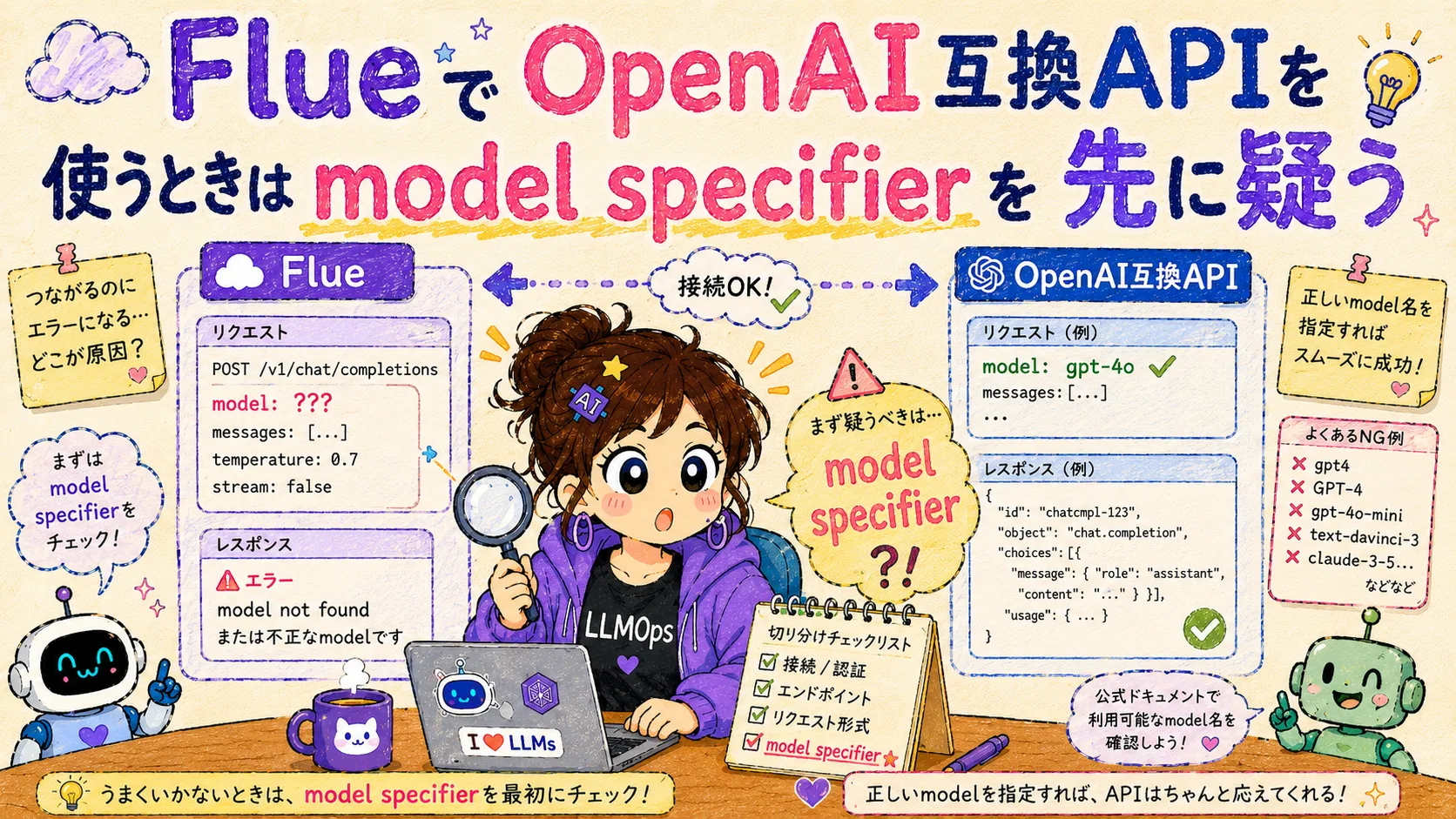
When I built a GitHub Issue triage agent with Flue 1.0 Beta, the first thing that got me stuck wasn’t the agent design—it was the model specification.
Trying Out a GitHub Issue Triage Agent with Flue 1.0 Beta https://llm-lab.dev/posts/flue-1-0-beta-issue-triage-agent/
It wasn’t wrong to assume I could just point it at an OpenAI-compatible API available locally. However, passing the API-side model ID straight into FLUE_MODEL resolves differently on the Flue side.
That’s where I hit Unknown model specifier.
That wasn’t the issue!!
What I expected was for the request to be sent to the connected API and for a model-side error to come back. But in reality, Flue’s model specifier resolution stopped me before the request was even sent. In other words, before we even get to API keys, base URLs, or whether the model supports tool calling, Flue couldn’t figure out which provider to use.
What I Mixed Up
The confusion was between the API-side model ID and Flue’s model specifier.
In an OpenAI-compatible API setup, the destination accepts a specific model ID. Let’s say it’s something like this:
preview/Kimi-K2.6On the other hand, the model passed to Flue’s agent settings isn’t just a remote model ID—it’s specified in provider-id/model-id format. If you treat the OpenAI-compatible API as Flue’s built-in openai provider, you write it like this:
openai/preview/Kimi-K2.6The former is the model name on the API side; the latter is the Flue-side specification that includes the connection route. Missing this distinction means failure before you even get to model performance or tool calling.
Replacing the openai Provider Without Adding a New One
In this experiment, instead of creating a custom provider ID, I redirected the built-in openai provider to the OpenAI-compatible API. Since the article’s focus is on running an agent in Flue rather than introducing a specific provider, I’ve kept the provider name abstract.
import { registerProvider } from '@flue/runtime';

const openAiCompatibleApiKey = process.env.OPENAI_COMPAT_API_KEY;
const openAiCompatibleBaseUrl = process.env.OPENAI_COMPAT_BASE_URL;

if (openAiCompatibleApiKey && openAiCompatibleBaseUrl) {
	registerProvider('openai', {
		baseUrl: openAiCompatibleBaseUrl,
		apiKey: openAiCompatibleApiKey,
		models: {
			'preview/Kimi-K2.6': {
				contextWindow: 131_072,
				maxTokens: 16_384,
			},
		},
	});
}
With this setup, the provider ID on Flue remains openai. Therefore, the model specified from the agent or workflow becomes openai/<remote-model-id>.
OPENAI_COMPAT_API_KEY="your-api-key"
OPENAI_COMPAT_BASE_URL="https://your-openai-compatible-endpoint/v1"
FLUE_MODEL="openai/preview/Kimi-K2.6"
The important thing here is the separation of roles: OPENAI_COMPAT_BASE_URL determines where the API points, while openai/ in FLUE_MODEL determines the provider resolution inside Flue. Both are about “model connection,” so they’re easy to confuse, but they’re looking at different layers.
Checking the Shape Before Calling
This kind of blockage can be detected before you actually call the LLM. I added a small validation script to the test environment that only checks whether FLUE_MODEL is in the right shape and whether the OpenAI-compatible API environment variables are set.
This isn’t an official Flue CLI—it’s a verification script I prepared for this article. It takes environment variables FLUE_MODEL, OPENAI_COMPAT_BASE_URL, and OPENAI_COMPAT_API_KEY as input, and doesn’t send any requests to the provider. It only checks whether FLUE_MODEL is in provider-id/model-id format and whether the environment variables for pointing to the OpenAI-compatible API are configured.
npm run check:model-specifierThe output shows only the key points without exposing secret values, like this:
{
  "model": "openai/preview/Kimi-K2.6",
  "validSpecifierShape": true,
  "providerId": "openai",
  "modelId": "preview/Kimi-K2.6",
  "openAiCompatibleBaseUrlConfigured": true,
  "openAiCompatibleApiKeyConfigured": true
}
This check is modest, but it works when you’re touching an agent framework. Model call failures are spread across multiple layers: provider resolution, authentication, base URL, model ID, tool calling, structured output, and so on. If you try to look at everything in a single flue run from the start, it becomes hard to tell where the failure is.
Layers to Separate During Agent Verification
From this failure, I felt that when connecting an OpenAI-compatible API to an agent framework, you should look at least the following layers separately:
- Can Flue resolve the model specifier?
- Is the provider configuration pointing to the expected base URL?
- Does the API key pass authentication?
- Does the connected API accept the specified model ID?
- Can that model follow tool calling and structured output?
Unknown model specifier is a problem at layer 1. When you’re stopped here, you haven’t evaluated the model’s capability, the quality of the OpenAI-compatible API, or the agent’s prompt design yet.
Conversely, just isolating this point makes subsequent verification much easier. Once you know FLUE_MODEL is shaped correctly, you can proceed to authentication next, then the actual model ID, then tool calling, in that order.
Summary
When using an OpenAI-compatible API in Flue, don’t pass the API-side model ID straight to the agent. Instead, specify it as a Flue-side model specifier that includes the provider ID.
FLUE_MODEL="openai/<remote-model-id>"If you get this one point wrong, Flue’s model resolution stops you before you even call the LLM. When you want to verify agent behavior, it seems better to separate things in the order of connection path first, then authentication, and finally agent quality.
Honestly, this is a dull configuration step before you get to agent design. But if you move forward while leaving this ambiguous, “is it the model?”, “is it the provider?”, and “is it the agent build?” all get mixed together. These modest boundary checks are exactly the kind of thing worth documenting as AgentOps.